How to Use TeraBox for a Small Business: Complete Guide 2025
Running a small business means every resource matters—your time, your money, and your digital storage. TeraBox has quickly become a popular option for small businesses thanks to its massive cloud storage, easy file sharing, and simple interface. Whether you manage documents, client files, images, or videos, TeraBox can help you stay organized without spending a fortune.
Below is a detailed guide on how small businesses can effectively use TeraBox for day-to-day operations.
What Is TeraBox and Why Small Businesses Should Consider It?
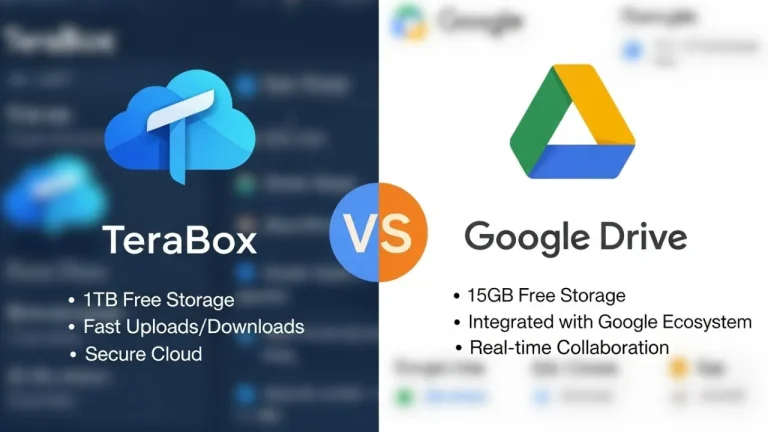
TeraBox is a cloud storage platform known for offering 1TB of free storage, which is more than enough for many growing businesses. You can store documents, media files, backups, and business resources in one secure place.
Benefits for small businesses include:
- Large free storage capacity
- Access files from any device
- Easy file sharing with clients or team members
- Automatic backup for important business data
- Affordable premium plans
- Secure storage with privacy features
Setting Up TeraBox for Business Use
Getting started is simple and quick. Follow these steps:
Step 1: Create an Account
Sign up using your email, Google account, or phone number. For business purposes, it’s better to use your official business email so all files stay in one place.
Step 2: Download the App or Use Web Version
TeraBox works on Windows, Android, iOS, and the web. Choose whichever platform your business uses most.
Step 3: Organize Your Workspace
Before uploading anything, create folders such as:
- Client Files
- Invoices & Finance
- Marketing Material
- Product Photos
- Internal Documents
This helps keep everything clean and easy to find as your storage grows.
How to Upload and Manage Business Files
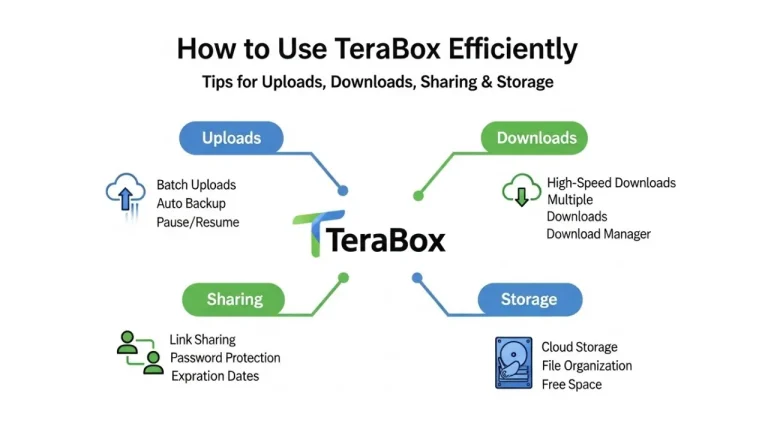
Uploading is straightforward. You can drag-and-drop files on desktop or use the upload button on mobile.
Use Folder Structures
Organizing files into clearly labeled folders will save time and reduce confusion, especially if you’ll share access with others.
Add Tags or Notes
If your business handles many documents, use file names that include dates or project names to avoid mixing things up.
Sharing Files Securely With Clients or Team Members
One of the best features of TeraBox is effortless file sharing.
How to Share
- Select any file or folder
- Click “Share”
- Choose between a link, QR code, or password-protected share
This is great for sending:
- Client proposals
- Project updates
- Design drafts
- Product photos
- Training material
Protect Your Files
You can set a password or expiration date on shared links to maintain confidentiality—very useful for businesses that handle sensitive data.
Using TeraBox as a Backup System
Small businesses often overlook backups—until something goes wrong. TeraBox can act as your affordable backup solution.
Automatic Photo and File Backup
If your business uses mobile devices or cameras (e.g., product photography), enable automatic backup.
Desktop Sync
Use TeraBox for PC to sync important business folders so they are always backed up in the cloud.
Disaster Recovery
If your laptop fails or files get corrupted, you’ll still have secure access to everything stored on TeraBox.
How TeraBox Helps Teams Collaborate Better
Even small teams need tools to stay connected.
Centralized Storage
All team files can live in one cloud space where everyone has controlled access.
Instant Access
Team members can download or upload files anytime—even while working remotely.
Version Tracking
Updating documents becomes easier since you can replace or manage versions without losing the original file.
Using TeraBox for Marketing and Social Media Management
Small businesses often rely on images and videos for marketing.
Store and Organize Media Files
Keep your product photos, ad creatives, reels, and promotional videos neatly stored.
Quickly Share Assets With Designers
Send shared links to freelancers or marketing partners without needing heavy attachments.
Access Media on the Go
If you manage your social media from your phone, TeraBox gives instant access to all stored media.
Upgrading to TeraBox Premium — Worth It for Small Businesses?
While the free 1TB plan is excellent, some businesses may benefit from premium features.
Premium Includes:
- 2TB storage
- Faster upload/download speeds
- Longer share link expiration
- Larger file size upload limits
- Ad-free experience
If you manage large video files or collaborate with multiple team members, the upgrade can be a smart investment.
Best Practices for Using TeraBox in Your Business
To get the most value from TeraBox:
- Keep files organized from day one
- Share files securely with passwords
- Use descriptive naming conventions
- Regularly back up important business files
- Delete unnecessary items to maintain order
- Use premium if dealing with large files often
Final Thoughts
TeraBox is a powerful, budget-friendly tool for small businesses that need simple, secure, and efficient cloud storage. Whether you run an online store, a service-based company, or a small creative agency, TeraBox can make file management easier and improve team productivity.