Does TeraBox Delete Files? What Users Need to Know in 2026
TeraBox has become one of the most popular cloud storage platforms because it offers an impressive 1TB of free storage. But with its rising popularity, one question many users ask is: Does TeraBox delete files?
The short answer is TeraBox does not delete files automatically—but there are certain cases where files can be removed.
In this article, we break down everything you need to know about file deletion, storage safety, and best practices to protect your data.
Does TeraBox Automatically Delete Your Files?
No, TeraBox does not delete your files automatically as long as:
- Your account is active
- You haven’t deleted the files yourself
- You’re using the correct login account
- Your files are successfully uploaded
Simply storing files in TeraBox will not cause them to disappear. Whether you are a free or premium user, your files remain safe unless a specific deletion action occurs.
When TeraBox Will Not Delete Your Files
Many users worry that uninstalling the app or running out of space might lead to file loss. Here’s the truth:
Uninstalling TeraBox Doesn’t Remove Cloud Files
If you uninstall the app from your phone or PC, your stored files remain in your cloud account. They will still be there when you log in again.
Reaching Storage Limit Doesn’t Cause Deletion
Exceeding your storage limit only prevents you from uploading more files—it won’t erase existing ones.
Files Stay as Long as You Keep Your Account
Your uploads remain secure on TeraBox servers as long as the account is active and not deleted.
Situations Where TeraBox Can Delete Files
Although TeraBox doesn’t erase files randomly, some conditions can lead to permanent deletion.
1. You Delete Files Yourself
When you delete a file, it goes into the Recycle Bin, where it stays temporarily.
2. Recycle Bin Expiration
Files placed in the Recycle Bin don’t stay there forever.
- Free users: Files are kept for around 10 days
- Premium users: Retention can extend up to 30 days
If you don’t restore them within this time frame, TeraBox will automatically delete them permanently.
3. Account Deletion
If you delete your TeraBox account intentionally, all stored files will be erased permanently. This includes all backups, photos, videos, documents, and folders.
4. Incomplete Uploads
If a file upload was interrupted or your internet connection dropped, the file may never have uploaded in the first place. Users sometimes mistake this for data loss.
Why Some People Think TeraBox Deletes Files
Sometimes the problem is not deletion but misunderstanding. Here are common reasons users believe files have disappeared:
Logging Into the Wrong Account
Many people use multiple sign-in options—Google, phone, Facebook, etc. Logging into the wrong account may show an empty storage space, making it seem like files were lost.
Files Moved to Another Folder
Accidental folder moves or renaming can make files appear missing.
Corrupted or Interrupted Upload
If your upload never finished, the file won’t appear in your cloud drive.
App Cache Issues
Sometimes the mobile app may not load your updated file list until you refresh or clear cache.
How to Recover Deleted Files in TeraBox
If you deleted something by mistake, you may still be able to get it back.
Step 1: Go to Recycle Bin
Open TeraBox and tap the Recycle Bin option.
Step 2: Select the Files
Choose the files or folders you want to restore.
Step 3: Restore
Click Restore to move them back to your main storage.
Remember—the recovery window is limited. After the retention period ends, deleted files cannot be restored.
Does TeraBox Delete Files Due to Inactivity?
As of now, TeraBox has no official policy stating that files will be deleted due to inactive accounts.
However, it’s always a good practice to log in occasionally, especially if you rely on TeraBox for important storage.
Is TeraBox Safe for Long-Term Storage?
Yes, TeraBox is generally safe for long-term file storage, but it’s always wise to follow best backup practices.
Here’s how to ensure your files remain safe:
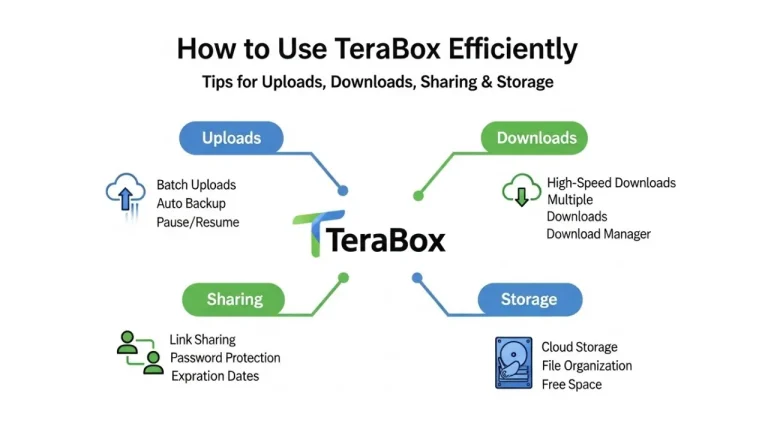
Use Clear Folder Organization
Better organization reduces the risk of losing or misplacing files.
Enable Automatic Backup
This prevents unintentional file loss from your device.
Keep Duplicates of Important Files
Never rely on only one cloud platform. Use TeraBox along with Google Drive or an external hard drive for critical files.
Upgrade If Needed
Premium plans offer larger storage, longer recycle-bin retention, and better upload limits.
How to Prevent File Loss in TeraBox
To avoid accidental deletion or confusion, follow these tips:
- Always check the Recycle Bin before assuming your file is gone
- Use only one login method to avoid account confusion
- Regularly back up important folders manually
- Confirm uploads before closing the app
- Keep track of your recycle-bin window
These practices ensure your files remain safe and accessible whenever you need them.
Final Thoughts
So, does TeraBox delete files?
Not unless you delete them yourself or the Recycle Bin retention expires.
TeraBox provides secure cloud storage and does not remove your files unexpectedly or automatically. The only time files are deleted is when:
- You manually delete them
- They expire in the Recycle Bin
- You delete your entire account
By following simple best practices, you can keep all your important files organized, safe, and available whenever you need them.